

Introduction: Why Your To-Do List Feels Like a Trap
Your day starts with a plan… and ends with the most important task still undone.
That’s not a time problem. It’s a priority problem—and it’s exactly why time prioritization techniques for busy professionals matter more than ever.
You’re not short on hours. You’re just overloaded with choices, distractions, and tasks that feel urgent but don’t actually move the needle.
Time prioritization techniques help you cut through that noise, decide what truly matters, and focus on it first—without feeling overwhelmed.
Because if everything feels urgent, nothing really is.
What Are Time Prioritization Techniques?
At their core, time prioritization techniques are methods that help you decide:
- What to do first
- What to delay
- What to delegate
- And what to delete completely
Think of it as curating your day instead of reacting to it.
These techniques combine urgency, importance, and even your energy levels to guide smarter decisions—not just faster ones.
1. The Eisenhower Matrix: Stop Treating Everything as Urgent
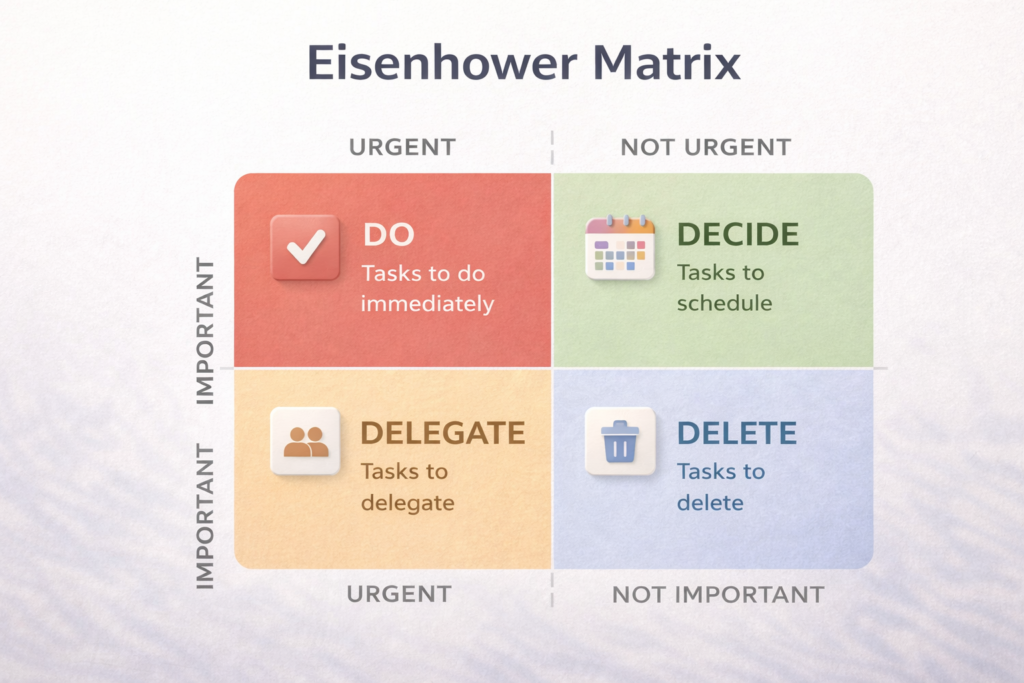
This classic method is one of the most powerful task prioritization techniques out there.
It splits your tasks into four categories:
| Urgent | Not Urgent |
|---|---|
| Important → Do now | Important → Schedule |
| Not Important → Delegate | Not Important → Eliminate |
Why it works:
It forces you to pause and ask: Is this actually important, or just loud?
Real-life example:
- Replying to a random Slack message = Urgent, not important
- Planning your quarterly goals = Important, not urgent
And guess which one usually gets ignored?
2. Time Blocking: Give Every Hour a Job
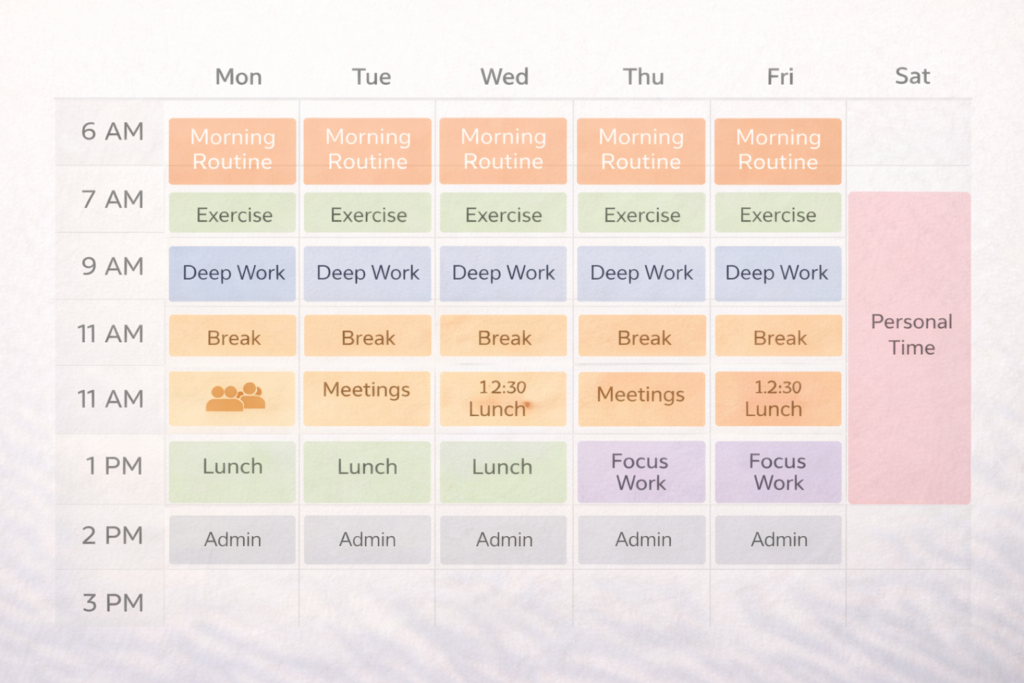
If your calendar is empty, your priorities are unclear.
Time blocking prioritization means scheduling your day in chunks—each block dedicated to a specific task.
How to do it:
- 9–11 AM → Deep work
- 11–12 PM → Meetings
- 2–3 PM → Admin tasks
Why it works:
It protects your focus from constant interruptions.
You’re not deciding what to do next every 10 minutes. You already decided.
3. The 1-3-5 Rule: Simplicity Wins
This is perfect if you’re overwhelmed.
Each day, you commit to:
- 1 big task
- 3 medium tasks
- 5 small tasks
That’s it.
No 47-item to-do list. No chaos.
Best for:
- Beginners
- Busy professionals juggling multiple roles
4. The Pomodoro Technique: Work in Sprints, Not Marathons

You work for 25 minutes. Then take a 5-minute break.
Repeat.
That’s the whole idea.
Why it works:
- Reduces burnout
- Improves focus
- Makes big tasks feel manageable
This is one of the best time prioritization techniques for productivity because it helps you start, which is often the hardest part.
5. Most Important Task (MIT): Win Your Day Early
Before your day begins, ask yourself:
“If I only accomplish ONE thing today, what should it be?”
That’s your MIT.
Do it first. Before emails. Before meetings. Before distractions take over.
Why it works:
It aligns your day with your long-term goals—not just urgent noise.
6. Value vs Effort Scoring: When Everything Feels Urgent
Insert image of value vs effort grid here
When your task list explodes, this method brings clarity.
| Task | Value | Effort | Priority |
|---|---|---|---|
| Client proposal | High | Medium | High |
| Inbox cleanup | Low | Low | Low |
Why it works:
You focus on high-impact work—not just easy wins.
7. Weekly Theming: Reduce Decision Fatigue
Instead of switching contexts every hour, assign themes to days:
- Monday → Planning
- Tuesday → Deep work
- Wednesday → Meetings
- Friday → Review
If you want a deeper comparison, here’s a complete guide to the best planner apps for busy schedules.
Why it works:
Your brain loves patterns. This reduces mental switching and boosts efficiency.
How to Prioritize Work and Personal Life (Without Burning Out)
Let’s get real.
You’re not just a professional. You’re a human with a life outside work.
Here’s how to balance both:
- Schedule personal time like meetings
- Use time blocking for family, health, rest
- Set boundaries (yes, even with your boss)
Because if you don’t prioritize your life, your work will consume it.
Best Time Prioritization Techniques for Remote Teams
If you work remotely, priorities can get messy fast.
Here’s what helps:
- Shared Kanban boards (like Trello)
- Daily stand-ups
- Clear deadlines and ownership
- Time-blocked calendars
These create visibility and alignment—even when everyone’s in different time zones.
Tools That Make Time Prioritization Easier
Here are some practical tools you can use:
- Todoist – Great for structured task prioritization
- TickTick – Combines tasks + calendar + Pomodoro
- Google Calendar – Perfect for time blocking
- Notion – Custom workflows and dashboards
- Trello – Visual task management
You don’t need all of them. Pick one and stick with it.
How to Know If Your Time Prioritization Is Working
Give it 1–2 weeks and ask yourself:
- Are you completing high-priority tasks?
- Do you feel less overwhelmed?
- Is your schedule aligned with your goals?
If yes—you’re on the right track.
If not—adjust. That’s part of the process.
Common Mistakes to Avoid
Let me save you some frustration:
- Trying too many techniques at once
- Confusing busy work with meaningful work
- Ignoring energy levels
- Not reviewing your priorities regularly
Keep it simple. Consistency beats complexity.
Conclusion: Your Time, Your Rules
At the end of the day, time prioritization techniques for busy professionals aren’t about doing more.
They’re about doing what matters.
Start small. Pick one method. Test it.
And remember—your calendar should reflect your priorities, not your chaos.
Final Thought (A Little Reality Check)
You don’t need more time.
You just need better decisions about the time you already have.
So… what’s your one priority today?