

Introduction
Have you ever had a busy day and thought, “I worked all day, so why doesn’t it feel like progress?”
You make a plan first. Then meetings go on for too long, messages pile up, and little tasks take your attention away.
You’ve been busy all day, but the important work has barely moved by night.
I know what it’s like. Most people who work have.
That’s why professionals don’t track time to control it; they do it to make things clear.
So get your coffee. Let’s look at the best time tracking methods for busy professionals to keep track of their time. They should be easy to use, useful, and realistic.
When you can clearly see where your time goes, everything changes, and you finally feel like you can control your productivity.
What is Time Tracking for Professionals?
In simple words, time tracking means:
Keeping a record of how you spend your work hours.
That could be:
- Tracking time spent on tasks
- Logging billable hours
- Monitoring productivity
- Understanding work habits
Whether you’re in a corporate job, running a business, or freelancing — professional time tracking gives you clarity.
Think of it like checking your bank account — but instead of money, you’re tracking your most limited resource: time.
Why Time Tracking is Important (And Not Just for Managers)
Here’s the truth most people don’t say:
You’re probably wasting more time than you think.
Not intentionally. Just… silently.
Time tracking helps you:
- Spot time leaks (hello, endless scrolling 👀)
- Improve focus
- Understand your real workload
- Set better boundaries
- Increase billable accuracy
A study from the American Psychological Association shows that multitasking can reduce productivity by up to 40%.
That’s huge.
And yes — time tracking improves productivity because it forces awareness.
Manual vs Automatic Time Tracking: Which is Better?
Let’s settle this debate once and for all.
| Feature | Manual Time Tracking | Automatic Time Tracking |
|---|---|---|
| Effort | High | Low |
| Accuracy | Medium | High |
| Control | High | Medium |
| Ease of Use | Simple | Smart & seamless |
| Best For | Simple workflows | Busy professionals |
Manual Time Tracking
You start/stop a timer or fill a timesheet.
Good for:
- Small tasks
- Simple routines
But… easy to forget.
Automatic Time Tracking
Runs in the background. Tracks apps, tasks, and activity.
Perfect if you:
- Jump between tasks
- Work remotely
- Hate admin work
👉 Verdict: If you’re busy (and you are), go automatic.
9 Best Time Tracking Methods for Busy Professionals
Let’s get practical.
Here are the methods that actually work — not just sound good in theory.
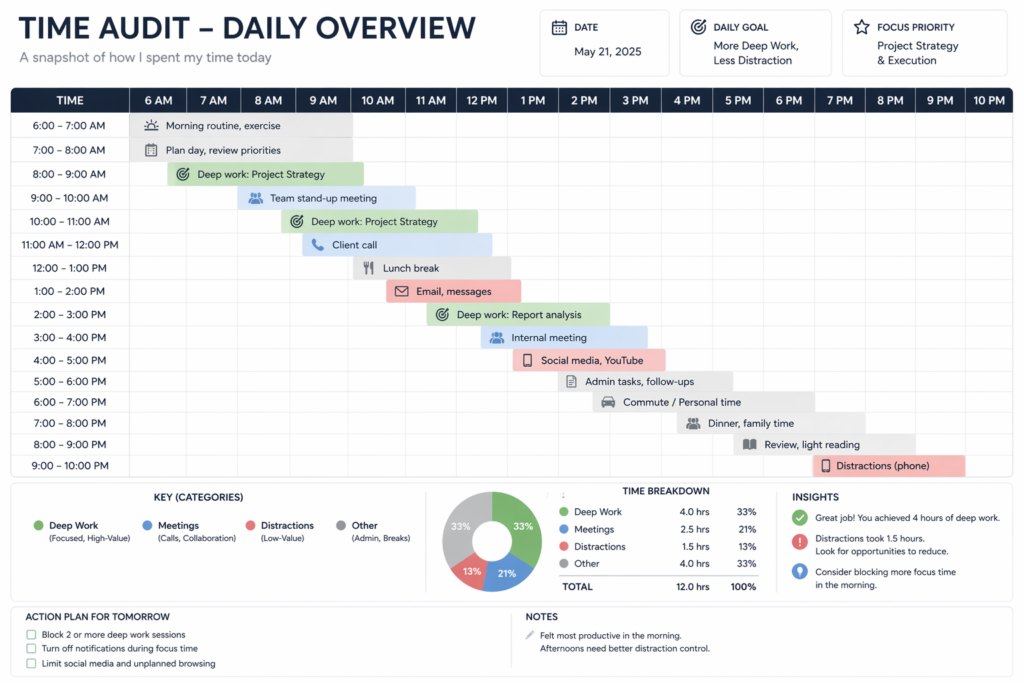
1. The Time Audit Method (Know Where Your Time Goes)
Before fixing anything, you need data.
A time audit means tracking everything you do for 3–5 days.
Yes, everything.
- Emails
- Meetings
- Breaks
- Deep work
👉 You’ll quickly see patterns like:
- Too many meetings
- Low-focus afternoons
- Hidden distractions
2. The Pomodoro Technique (Short Bursts, Big Results)
Work for 25 minutes → break for 5 minutes.
Repeat.
Simple. Powerful.
It’s great for:
- Beating procrastination
- Staying focused
Combine this with a time tracking app and you’ll see exactly how productive your sessions are.
3. Block Scheduling (Own Your Calendar)
Instead of reacting to your day, plan it.
Divide your day into blocks like:
- Deep work
- Meetings
- Admin tasks
This is one of the best time management strategies out there.
4. Task-Based Time Tracking (Project-Focused Work)
Track time per task or project.
Perfect for:
- Agencies
- Consultants
- Freelancers
This is essential for project time tracking and project budget tracking.
5. Billable Hours Tracking (Get Paid Properly)
If you charge clients — this is non-negotiable.
Billable hours tracking ensures:
- Accurate invoicing
- Fair pricing
- No undercharging
6. Real-Time Tracking (Track as You Work)
Start a timer when you begin a task.
Stop when you’re done.
Great for discipline.
Not great if you forget (and you will 😅).
7. Retrospective Time Tracking (Log After Work)
You log your time at the end of the day.
Easy — but less accurate.
Works best with memory + notes.
8. Productivity Tracking (Focus on Output)
This method goes beyond time.
It tracks:
- Focus levels
- App usage
- Distractions
A good productivity tracker helps you understand how you work, not just how long.
9. Team Time Tracking (For Collaboration)
If you manage a team, this matters.
Team time tracking helps with:
- Project timelines
- Workload balance
- Accountability
And no — it doesn’t have to feel like surveillance.
Best Time Tracking Apps for Professionals (Top Picks)
Let’s talk tools.
Because methods are great… but tools make them stick.
| Tool | Best For | Key Feature |
|---|---|---|
| Toggl Track | Individuals & teams | Simple UI |
| Memtime | Automatic tracking | Background tracking |
| Harvest | Billing & invoicing | Billable hours |
| Clockify | Free users | Unlimited tracking |
| RescueTime | Productivity insights | Focus tracking |
| Hubstaff | Teams | Activity monitoring |
| Paymo | Projects | Task + time tracking |
If you’re looking for a broader set of tools to manage your entire workflow, here are the best planner apps for organizing tasks and schedules effectively.
Recommended Tools Breakdown
- Toggl Track – clean and beginner-friendly
- Memtime – fully automatic time tracking
- Harvest – best for freelancers billing clients
- Clockify – great free option
- RescueTime – ideal for productivity monitoring
How Time Tracking Improves Productivity (Without Feeling Robotic)
Here’s the magic.
Time tracking isn’t about control.
It’s about awareness.
When you see your time:
- You make better decisions
- You prioritize smarter
- You stop guessing
And suddenly — your day feels lighter.
Time Tracking Best Practices (That Actually Work)
Let’s keep it real.
Tools alone won’t fix your workflow.
You need habits.
Follow these:
- Start small (don’t track everything at once)
- Use reminders
- Review weekly reports
- Avoid over-tracking
- Focus on insights, not perfection
Time Tracking for Freelancers and Consultants
If you’re billing clients — listen carefully.
Time tracking for freelancers and time tracking for consultants is critical.
Why?
Because:
- Your time = your income
- You need proof of work
- Clients expect transparency
Use tools with:
- Billable tracking
- Invoicing
- Reports
What Features Should You Look for in a Time Tracking App?
Not all apps are created equal.
Look for:
- Automatic tracking
- Idle detection time tracking
- Time tracking reminders
- Project tracking
- Integrations (Slack, Asana, etc.)
- Reporting dashboards
Timesheet Software vs Time Tracking Software
People confuse these all the time.
| Feature | Timesheet Software | Time Tracking Software |
|---|---|---|
| Input | Manual | Automatic + manual |
| Use | Payroll | Productivity + tracking |
| Accuracy | Medium | High |
👉 In short:
- Timesheet software = logging hours
- Time tracking software = understanding work
Is Time Tracking Legal and Ethical?
Short answer: Yes — if done right.
Guidelines:
- Be transparent
- Respect privacy
- Avoid invasive tracking
In the U.S., employee time tracking is common and legal when communicated clearly.
How Time Tracking Reduces Wasted Time
This is where things get interesting.
Time tracking shows:
- Hidden distractions
- Inefficient meetings
- Repetitive tasks
Once you see it… you can fix it.
Can Time Tracking Help with Project Management?
Absolutely.
It helps you:
- Estimate better
- Stay on budget
- Track progress
That’s why project time tracking is a must in modern workflows.
How to Choose the Best Time Tracking Software
Here’s a quick checklist:
- Your work style (solo vs team)
- Budget
- Features needed
- Ease of use
Test 2–3 tools before committing.
Final Thoughts: Time is Your Most Valuable Asset
Let’s be honest.
You don’t need more time.
You need better visibility.
That’s what time tracking for professionals gives you.
Start simple.
Pick one method.
Use one tool.
And build from there.
Because once you understand your time…
You take control of your life.
Call to Action
If you’ve made it this far — you’re serious about improving your productivity.
So here’s your next step:
👉 Try one time tracking method today
👉 Test one app this week
👉 Review your time after 3 days
And tell me — what surprised you the most?
I’d love to hear your experience.