

Introduction
If your calendar looks like a game of Tetris and your inbox breeds overnight, you are not alone. In 2026, professionals are no longer asking if they should use AI. They are asking which tools are actually worth it? That is the real question.
I have tested dozens of platforms, and here is the simple truth: the best AI tools for professionals in 2026 are not flashy toys. They quietly save hours, reduce busywork, and help you focus on high-value work.
This guide is a practical listicle for busy people and professionals in the USA who want real results, not hype. Whether you work in marketing, law, healthcare, sales, consulting, or run your own business, there is something here for you.

Quick Answer: What Are the Best AI Tools for Professionals in 2026?
Here is the short list of top AI tools for professionals 2026:
- ChatGPT – best all-around AI assistant
- Claude – strong reasoning and long documents
- Microsoft Copilot – best for Microsoft 365 users
- Gemini – best for Google Workspace users
- Perplexity AI Pro – best for research and analysis
- Otter.ai – best for meeting notes
- Fireflies.ai – best for meeting intelligence
- Notion AI – best for knowledge management
- ClickUp Brain – best for project managers
- Grammarly Premium – best for writing clarity
- Jasper AI – best for marketers
- Zapier AI – best for automation
- GitHub Copilot – best for developers
- Cursor AI – best coding workspace
- Canva Magic Studio – best for design tasks
- Loom – best for async communication
- HeyGen – best AI avatar video tool
- Synthesia – best enterprise training videos
- ElevenLabs – best voice generation
- Rewind AI – best personal memory assistant
Comparison Table: AI Productivity Tools 2026
| Tool | Best For | Ideal User | Pricing Style |
|---|---|---|---|
| ChatGPT | Writing, planning, research | Most professionals | Free + Paid |
| Claude | Long docs, analysis | Analysts, legal, strategy | Free + Paid |
| Microsoft Copilot | Word, Excel, Teams | Corporate professionals | Paid |
| Gemini | Gmail, Docs, Sheets | Google Workspace users | Free + Paid |
| Perplexity | Source-backed research | Consultants, researchers | Free + Paid |
| Otter.ai | Meeting notes | Managers, sales teams | Free + Paid |
| GitHub Copilot | Coding | Developers | Paid |
Best AI Tools by Use Case
1. Best AI Assistants for Professionals 2026
ChatGPT (OpenAI)
Still the Swiss Army knife of AI. I use it for drafting emails, summarizing reports, brainstorming ideas, and turning messy notes into clean plans.
Claude (Anthropic)
Excellent when you need thoughtful answers and help with large documents. If ChatGPT is a fast coworker, Claude is the calm analyst.
Gemini (Google)
Great for users living inside Gmail and Google Docs. It feels natural if your workday already runs on Google Workspace.
2. Best AI Tools for Corporate Professionals 2026
Microsoft Copilot
If your company runs on Outlook, Teams, Excel, and Word, this one feels like cheating. It summarizes meetings, drafts follow-ups, and helps untangle giant spreadsheets.
Grammarly Premium
A lifesaver for professionals who send important emails. It catches awkward tone before your boss does.
3. AI Tools for Busy Professionals 2026
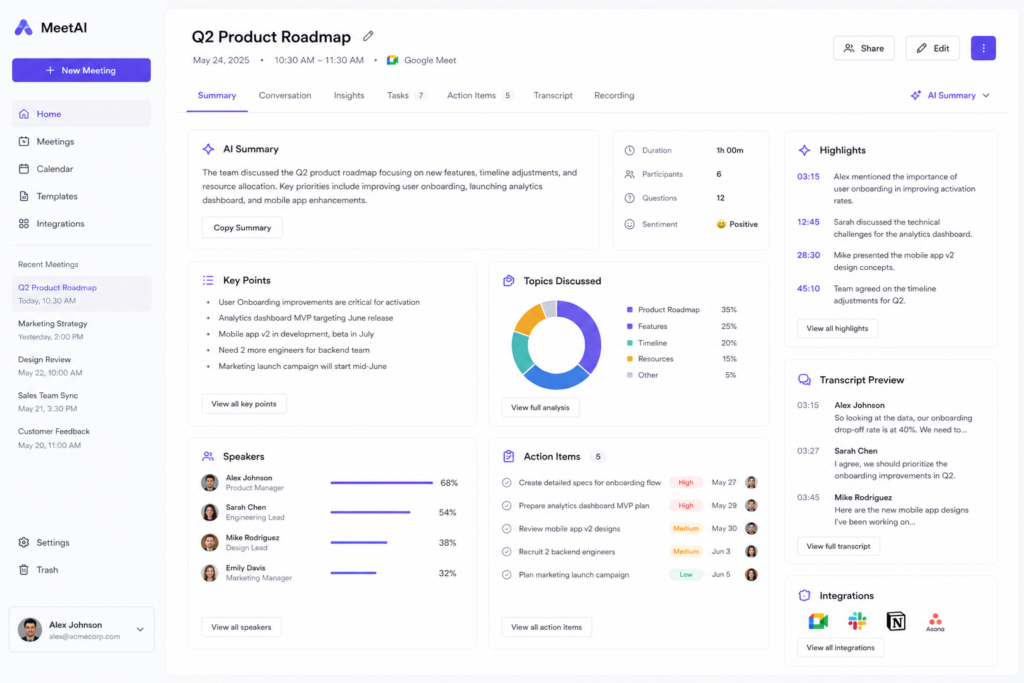
Otter.ai and Fireflies.ai
Both are excellent AI tools for meeting notes. They record meetings, create summaries, and list action items.
Loom
Need to explain something once instead of six times? Record a quick video update and move on with your day.
4. AI Tools for Project Managers
ClickUp Brain
Strong option for tracking tasks, summaries, deadlines, and bottlenecks.
Notion AI
Perfect for SOPs, project docs, team wikis, and notes that usually disappear into the void.
If your team also struggles to organize documents and internal knowledge, here are the best knowledge management tools for 2026.
5. AI Tools for Marketers in 2026
Jasper AI
Built for campaigns, ad copy, blogs, product descriptions, and scaling content.
Canva Magic Studio
Makes non-designers look suspiciously talented.
HeyGen / Synthesia
Useful for training videos, promos, and multilingual content.
6. AI Tools for Lawyers, Doctors, Sales Pros, and Freelancers
- Lawyers: Claude, Microsoft Copilot, Perplexity for document review and research.
- Doctors and medical professionals: secure note drafting, summaries, scheduling support (with approved compliant systems).
- Sales professionals: Otter.ai, Fireflies.ai, ChatGPT for call notes and outreach.
- Freelancers: ChatGPT, Canva, Loom, Zapier AI for doing more with less.
How Do AI Tools Help Professionals Save Time at Work?
Simple examples:
- Draft emails in minutes
- Summarize meetings instantly
n- Turn notes into action items - Analyze spreadsheets faster
- Build presentations quickly
- Automate repetitive admin work
- Speed up research
A task that used to take 2 hours often becomes 20 minutes. That math gets exciting fast.
Are AI Tools Expensive for Individuals or Small Teams?
Not always. Many offer free tiers. Paid plans often range from modest monthly subscriptions to enterprise pricing.
My honest advice: start with one core tool and one specialty tool.
Example:
- ChatGPT + Otter.ai
- Gemini + Grammarly
- Copilot + ClickUp Brain
Do Professionals Need Multiple AI Tools?
Usually yes, but not ten of them.
Think in layers:
- Core assistant (ChatGPT / Claude / Gemini)
- Workflow tool (Copilot / Notion / ClickUp)
- Specialty tool (Otter / Canva / GitHub Copilot)
That setup covers most people.
Which AI Tools Work Best With Microsoft 365 / Google Workspace?
Microsoft 365
- Microsoft Copilot
- Otter.ai
- Fireflies.ai
- Grammarly
Google Workspace
- Gemini
- ChatGPT
- Notion AI
- Zapier AI
What Are the Most Secure AI Tools for Sensitive Data?
Look for:
- Business or enterprise plans
- Admin controls
- Data retention settings
- SOC 2 / ISO certifications
- Private workspace options
- Clear privacy policies
For sensitive industries, involve IT and compliance before rollout.
Risks of Using AI Tools in Professional Settings
Let us be honest. AI is helpful, not magical.
Risks include:
- Wrong answers
- Bias in outputs
- Privacy mistakes
- Overreliance
- Weak fact-checking
- Compliance issues
Golden rule: trust, then verify. Actually, verify first.
How to Choose the Right AI Tools for Your Profession
Ask these five questions:
- What task wastes the most time each week?
- Do I use Microsoft or Google tools daily?
- Do I need writing, meetings, coding, or research help?
- Is data security critical?
- Will my team actually use it?
Choose based on pain points, not trends.
The most effective setups combine tools with clear workflows—here’s how to build a planning system that actually works for busy professionals.
Frequently Asked Questions
Can AI tools replace jobs, or are they just assistants?
Mostly assistants. They automate tasks, not entire careers. Professionals who use AI often gain an edge over those who ignore it.
Are there free AI tools for professionals that are still powerful in 2026?
Yes. ChatGPT, Gemini, Claude, Perplexity, Otter.ai, and Canva all offer useful free plans.
How can I integrate AI tools into my workflow?
Start small:
- Email drafting
n- Meeting summaries - Weekly planning
- Research requests
- Repetitive admin automations
Build habits before buying more tools.
Final Decision: The Best AI Tools for Professionals in 2026
If you want the easiest stack:
- ChatGPT is the best overall.
- Microsoft Copilot is the best for people who use Microsoft.
- Gemini is the best for Google users.
- Perplexity AI Pro is the best tool for research.
- Otter.ai is the best for meetings.
- Grammarly is the best tool for writing.
- ClickUp Brain is the best tool for managing projects.
- GitHub Copilot is the best tool for coding.
The smartest people in 2026 don’t work more hours. They are using better systems now.

So, here’s my challenge to you: choose one AI tool this week, use it every day for seven days, and keep track of how much time you save. You might never go back.